
navigation
v1.0.0Navigation Skill - Parse deeplinks, retrieve chapter data via MCP, focus on referenced elements or slices, and generate deeplinks for precise user navigation.
Navigation
Parse deeplinks, retrieve chapter data via MCP, focus on referenced elements or slices, and generate deeplinks for precise user navigation.
Overview
Navigation teaches AI agents how to interpret and generate deeplinks for prooph board. Instead of treating deeplinks as URLs to fetch, the agent learns to parse identifiers, retrieve chapter data via MCP tools, focus responses on specific elements or slices, and generate precise navigation links for users.
Why Navigation
- Precise targeting — Agents can focus responses on specific elements or slices referenced in deeplinks
- Better context — Parse workspace, chapter, and element identifiers to retrieve the exact data needed
- Clear communication — Generate deeplinks when referencing specific modeling issues or elements
- Efficient workflow — Navigate directly to problem areas without analyzing entire chapters
When to Use
| ✅ Use Navigation | ❌ Skip It |
|---|---|
| User provides a prooph board deeplink | Generic modeling questions without specific element references |
| Referencing specific elements in feedback | Working with entire chapters at once |
| Guiding users to specific modeling issues | No need for precise element/slice targeting |
| Asking questions about particular elements or slices | User doesn't need navigation links in responses |
Usage
Once installed, your AI agent will know how to:
Resolve Deeplinks
When a user provides a deeplink like:
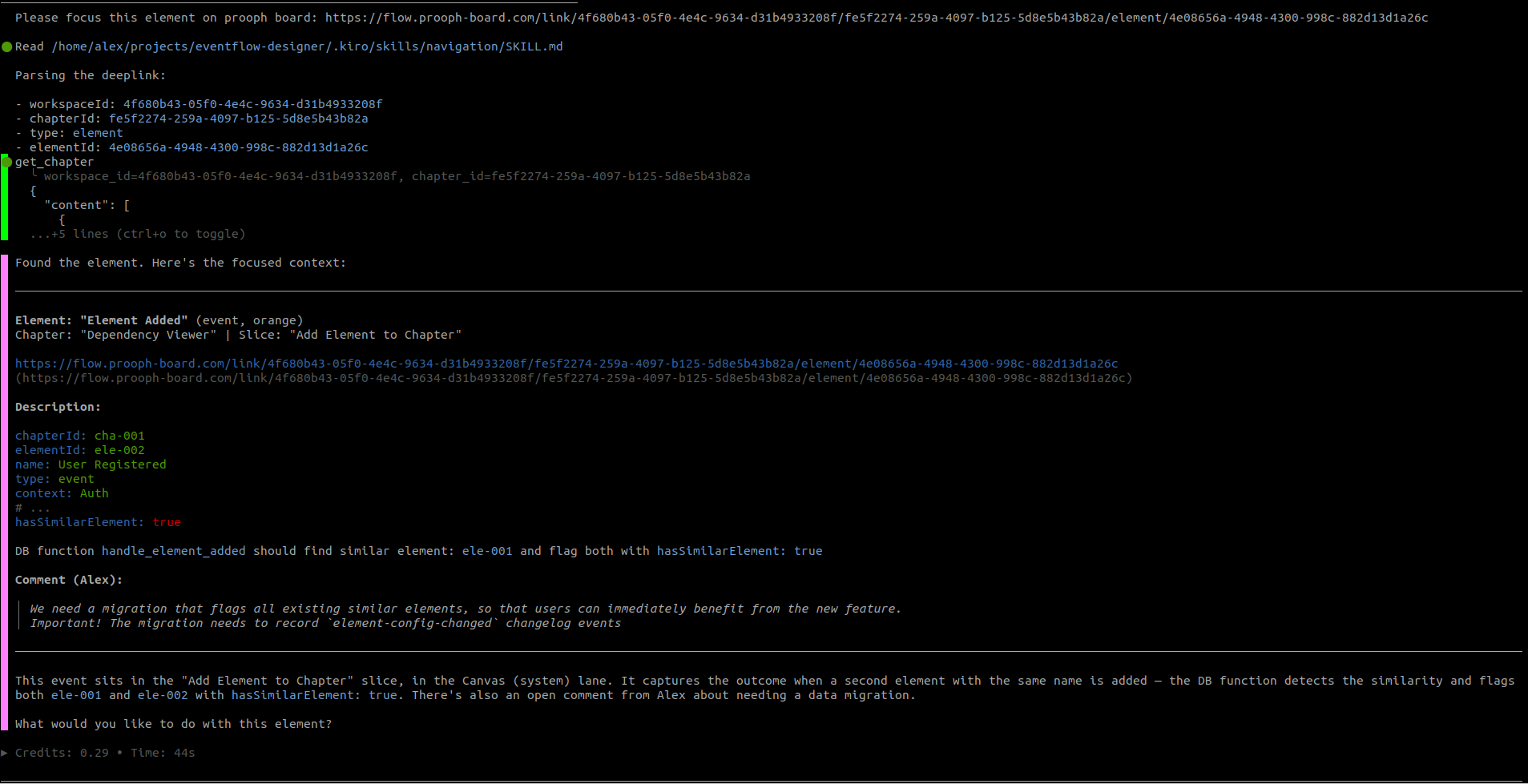
https://flow.prooph-board.com/link/{workspaceId}/{chapterId}/element/{elementId}
The agent will:
- Parse the identifiers (workspaceId, chapterId, type, targetId)
- Retrieve chapter data via
get_chapter_details()MCP tool - Locate the target element or slice
- Focus the response ONLY on that target
Generate Deeplinks
When referencing specific elements or slices, the agent will generate precise navigation links:
The command "Place Order" may violate modeling rules:
https://flow.prooph-board.com/link/{workspaceId}/{chapterId}/element/{elementId}
Best Practices
- Never fetch deeplinks as URLs — they are pointers, not resources
- Always scope responses — when a deeplink is provided, focus only on the referenced target
- Use exact IDs — never invent or approximate identifiers
- Generate links for clarity — include deeplinks when pointing to specific modeling issues
- Ask when unclear — if the deeplink structure is invalid or incomplete, ask for clarification
Examples
Resolving a Deeplink
User provides:
https://flow.prooph-board.com/link/ws123/ch456/element/elem789
Agent:
- Extracts:
workspaceId=ws123,chapterId=ch456,type=element,targetId=elem789 - Calls:
get_chapter_details("ws123", "ch456") - Finds element with ID
elem789 - Responds with information scoped to that element only
Generating Deeplinks
You can get a deeplink by right-clicking on an element or slice on prooph board and choose
Copy Link from the context menu. This will copy the deeplink into clipboard and you can
paste it into your agent chat.
Prompts like:
Please focus on element: [deeplink]
followed by specific instructions or questions should be enough to activate the skill.
| name | prooph-board-navigation |
|---|---|
| description | Prooph Board Navigation Skill - Parses deeplinks, retrieves chapter data via MCP, focuses on referenced elements or slices, and generates deeplinks for precise user navigation. |
Prooph Board — Navigation
This skill defines how to interpret and generate deeplinks for prooph board.
You are responsible for:
- extracting identifiers from deeplinks
- retrieving chapter data via MCP tools
- focusing responses on a specific element or slice
- generating deeplinks for user navigation
This skill is read-only and focus-oriented.
Core Principle
Deeplinks Are References, Not Resources
A deeplink is a pointer to a location, not something to open.
DO NOT:
- fetch the URL
- open the URL
- interpret it as content
DO:
- extract identifiers
- retrieve data via MCP
- focus your response accordingly
Deeplink Structure
https://flow.prooph-board.com/link/{workspaceId}/{chapterId}/{type}/{targetId}
Where:
workspaceId→ workspace identifierchapterId→ chapter identifiertype→elementorslicetargetId→ elementId or sliceId
Behavior 1 — Resolving Deeplinks
Use this when the user provides a deeplink.
Step 1 — Parse the Deeplink
Extract:
- workspaceId
- chapterId
- type
- targetId
Step 2 — Retrieve Chapter Data
Use MCP tool:
get_chapter_details(workspaceId, chapterId)
Step 3 — Locate Target
Based on type:
element
- find element by
elementIdin chapter data
slice
- find slice by
sliceIdin chapter data
Step 4 — Focus the Response
Once located:
- treat the element/slice as the primary context
- apply user instructions ONLY to that target
- ignore unrelated parts unless explicitly requested
Focus Rules
When a deeplink is used:
- the response MUST be scoped to the referenced element or slice
- do NOT analyze the entire chapter unless asked
- do NOT generalize beyond the target
Error Handling
Target Not Found
If the element/slice cannot be found:
- state that it was not found in the chapter
- ask the user for clarification or a correct link
Invalid Deeplink
If structure is invalid or incomplete:
- explain what is missing
- ask for a valid deeplink
Missing Type
If type is missing:
- do NOT guess
- ask the user whether it refers to an element or slice
Behavior 2 — Generating Deeplinks
Use this when:
- referencing specific elements or slices
- summarizing work
- asking targeted questions
- guiding user navigation
Deeplink Format
Always generate links in this format:
https://flow.prooph-board.com/link/{workspaceId}/{chapterId}/{type}/{targetId}
When to Generate Deeplinks
Create deeplinks when:
- pointing to specific modeling issues
- referencing elements in feedback
- asking questions about a specific element/slice
- summarizing important parts of a model
Example Usage
Instead of:
The "Place Order" command looks incorrect.
Write:
The command “Place Order” may violate modeling rules:
https://flow.prooph-board.com/link/{workspaceId}/{chapterId}/element/{elementId}
Precision Rules
- always use exact IDs from data
- NEVER invent IDs
- NEVER approximate or truncate IDs
Anti-Patterns
Fetching Deeplinks
Incorrect:
- treating the URL as a data source
Losing Focus
Incorrect:
- analyzing unrelated elements when a deeplink is provided
Guessing Targets
Incorrect:
- assuming element/slice when not specified
- inventing IDs
Integration with Other Skills
After resolving a deeplink:
- use Event Modeling skills for modeling or critique
- remain scoped to the referenced element/slice
Goal
Correct behavior means:
- precise parsing of deeplinks
- deterministic data retrieval via MCP
- strict focus on referenced element or slice
- clear, navigable deeplink generation for the user