
example-data
v1.2.0Example Data Skill - Guide for adding example data to Command, Event, and Information elements in prooph board. Covers YAML examples with concrete values, showing data structures, and documenting state changes in element descriptions.
Example Data
Add concrete YAML example data to Command, Event, and Information elements in prooph board.
Overview
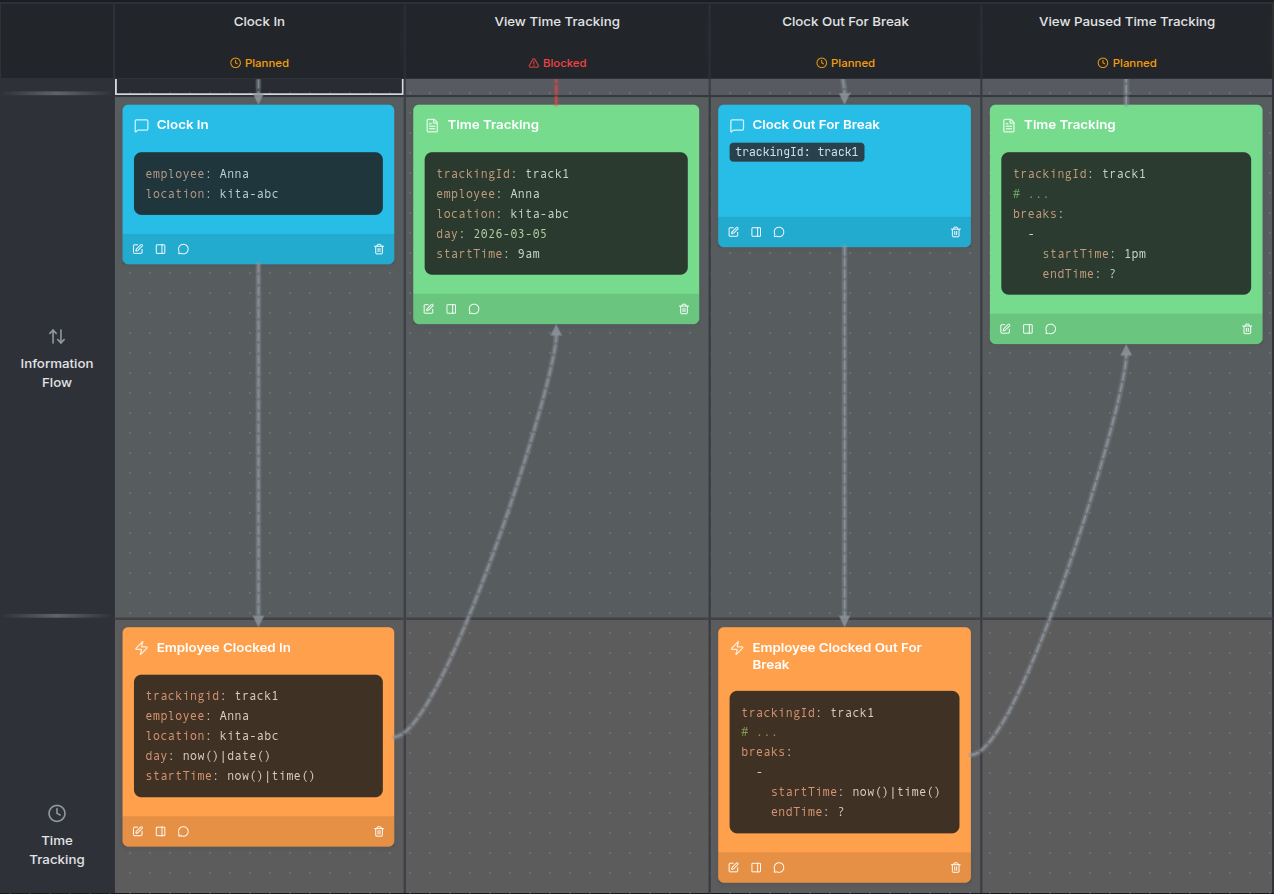
Example Data teaches AI agents how to add concrete, business-friendly data samples to element descriptions using YAML code blocks. Instead of abstract type definitions like string|format:uuid, this skill uses real-looking values like employee: Anna or trackingId: track1 — making the model understandable to non-technical stakeholders.
Why Example Data
- Clearer communication — Concrete values help business users immediately understand what data flows through the system
- Faster validation — Stakeholders can spot missing fields or incorrect assumptions at a glance
- Better agent guidance — Example data gives the AI agent a reference for what kind of information to expect and document
When to Use
| ✅ Use Example Data | ❌ Skip It |
|---|---|
| Documenting command payloads | Fields are obvious from the element name alone |
| Showing state changes after events | Technical specs already fully cover the data structure |
| Capturing available information from queries | The element is self-explanatory and well-understood |
Usage
Once installed, your AI agent will know how to add YAML example data to element descriptions. Examples use yaml code blocks with concrete values:
trackingId: track1
employee: Anna
location: loc-abc
day: 2026-03-05
startTime: 9am
Examples
Best Practices
- Use concrete values, not type definitions (save those for element details)
- Include only the fields relevant to this specific process step
- Use
# ...to indicate that unchanged data exists in the state - Use expressions like
now()|time()to show dynamic values computed at runtime
| name | example-data |
|---|---|
| description | Example Data Skill - Guide for adding example data to Command, Event, and Information elements in prooph board. Covers YAML examples with concrete values and documenting state changes. |
Example Data for Element Descriptions
This document describes how to add concrete example data to Command, Event, and Information elements in prooph board using YAML code blocks.
Why Example Data
Example data in element descriptions helps:
- Business users understand what data flows through the system
- Stakeholders validate that the model captures the right information
- Developers see concrete examples of expected payloads
Key Principles
Use Concrete Values, Not Types
✅ Good:
employee: Anna
location: loc-abc
startTime: 9am

❌ Avoid:
employeeId: string|format:uuid
locationId: string|format:uuid
startTime: string|format:time
Use schema/type definitions in element details (f.e. cody-schema), not in descriptions.
Show What Matters for This Step
Include only the fields relevant to understand this specific process step. Don't dump every possible field.
Command Elements
Commands represent business actions that change persistent system state. Show the data the command carries as input.
Pattern 1: Full Command Payload
trackingId: uuid
employee: uuid
location: uuid
day: 2026-03-05
startTime: 09:00
breaks:
  -
    startTime: 13:00
    endTime: 13:30
  -
    startTime: 15:00
    endTime: 15:15
endTime: 18:00
notes: Worked late on project documentation
Use when: The command has significant data that needs explanation.
Pattern 2: Minimal Identifier
trackingId: track1
Use when: The command only needs a reference ID and the context makes everything else clear.
Event Elements
Events represent business facts that became true. Show the state change the event carries.
Pattern 1: State After Event
trackingId: track1
# ...
breaks:
  -
    startTime: 1pm
    endTime: now()|time()
The # ... indicates that other data from the state remains unchanged. Use now()|time() to show dynamic values computed at runtime.
Pattern 2: Minimal Event Data
trackingId: track1
Use when: The event only carries an entity reference and the fact itself is clear from the event name.
Information Elements
Information represents data read from the system. Show a snapshot of available information.
Pattern 1: Complete State Snapshot
trackingId: track1
employee: Anna
location: loc-abc
day: 2026-03-05
startTime: 9am
breaks:
  -
    startTime: 1pm
    endTime: 1:30pm
endTime: 6pm
overtime: 0
Use when: Showing the full state after multiple events helps understand the process.
Pattern 2: Partial State
trackingId: track1
employee: Anna
location: loc-abc
day: 2026-03-05
startTime: 9am
Use when: Only certain fields are relevant to this step or the information represents a query result with limited fields.
Pattern 3: Empty Description
If the information element name is self-explanatory and the technical details in element details provide full specification, no example data may be needed.
Documenting State Changes
Before/After Format
```markdown
**Before**: Employee is not clocked in
**After**: Time tracking session started at 09:00 AM
This pattern makes state transitions explicit for business understanding.
Slice Width
When adding example data to an element, check the width of the slice the element belongs to. If the width is less than 320, use the resize_slice tool to set the slice width to 320 before or after updating the element description. Do it only once per slice.
Common Mistakes
Too Technical
```markdown
❌ Bad:
The command handler validates the schema and if valid, records an event to the event store which triggers projections to update the read model.

✅ Better:
System records the clock-in time and starts tracking work hours.
Missing Context
❌ Bad:
trackingId: track1

✅ Better:
trackingId: track1
employee: Anna
location: loc-abc
Provide enough context so readers understand what the data represents.
Duplicating Element Details
❌ Bad:
{
  "timeTrackingId": "string|format:uuid",
  "employeeId": "string|format:uuid"
}

✅ Better:
trackingId: track1
employee: Anna
Descriptions use example data; details use schema definitions.